
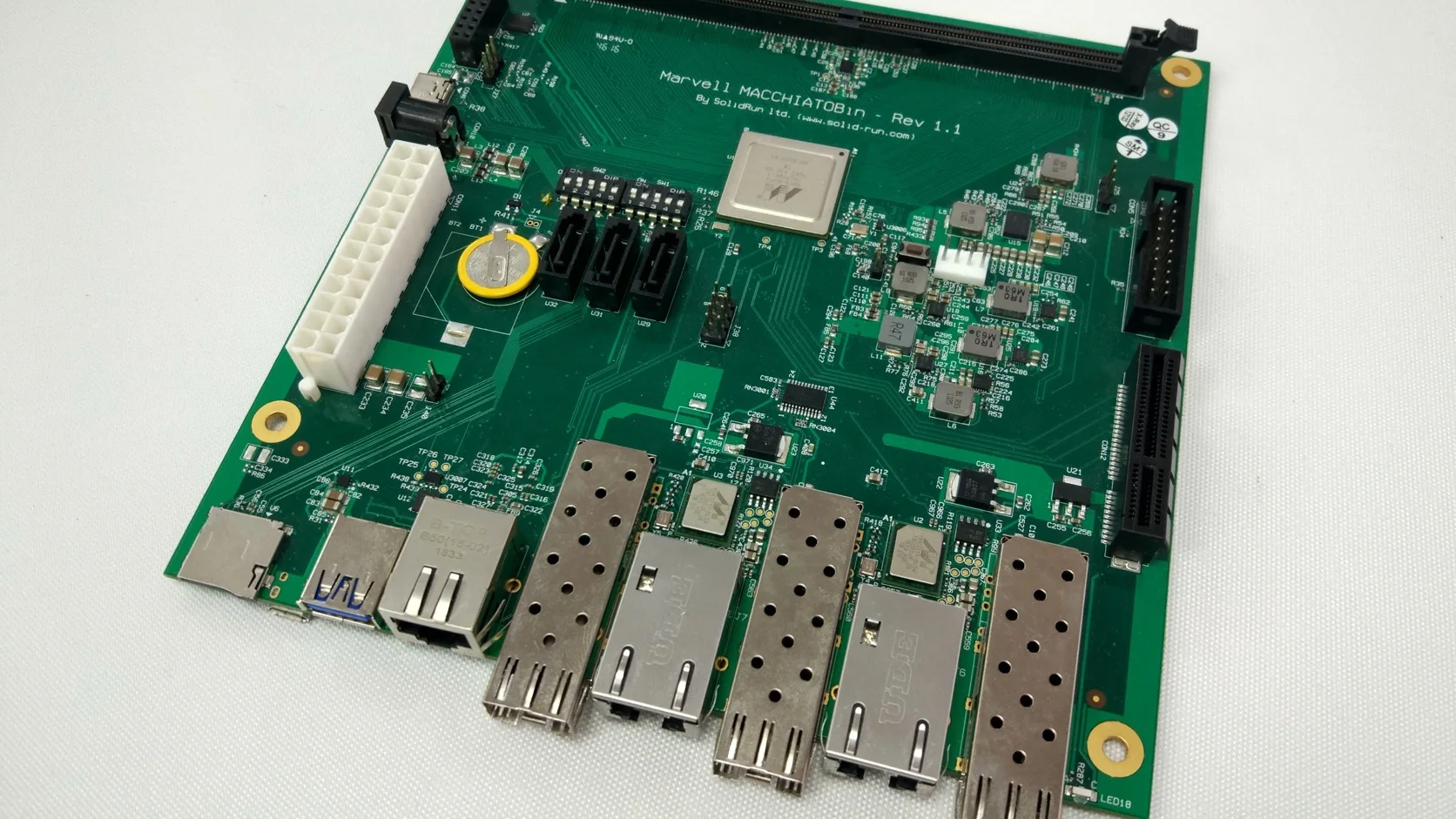
An industrial SBC is a complete computer built on one printed circuit board and intended to become part of a larger machine or product. It usually combines the processor, memory, storage, power management, and I/O on the same board. What makes it industrial is not the color of the PCB or the presence of a serial port. It is the way the board is specified, supported, and validated for a real deployment.
That distinction matters. A board can use an industrial-temperature processor and still be a poor choice for a ten-year product. The Ethernet controller may change without notice, the Linux image may depend on an abandoned kernel, or the board may expect clean bench power. Conversely, a modest-looking board can be a solid industrial platform if its bill of materials is controlled and its recovery behavior is well documented.
Industrial SBC Definition in One Table
| Area | What to expect from a credible industrial SBC | What still needs verification |
|---|---|---|
| Compute | CPU or SoC, RAM, boot storage, basic graphics | Sustained performance at maximum ambient temperature |
| Power | Defined input range and restart behavior | Reverse polarity, surge, brownout, and inrush protection |
| I/O | Ethernet, USB, display, serial, CAN, GPIO, or expansion | Isolation, transceivers, connector retention, driver support |
| Environment | Published operating temperature and humidity limits | Whether the rating applies to every fitted component |
| Lifecycle | Availability statement and change-notification process | Board-level BOM control, not only processor availability |
| Software | Bootloader, OS image, drivers, recovery method | Source access, update policy, reproducible builds |
| Documentation | Datasheet, mechanical drawing, pinout, block diagram | Revision history, errata, and test evidence |
There is no single feature that turns an SBC into an industrial SBC. The useful definition is a bundle of engineering commitments.
What Is Actually on the Board?
Most industrial single-board computers contain five functional groups:
- Compute: an ARM or x86 processor, RAM, clocks, and power sequencing.
- Boot and data storage: eMMC, SPI NOR, SATA, NVMe, or a removable card slot.
- External I/O: Ethernet, USB, display, audio, serial, CAN, and GPIO.
- Expansion: M.2, Mini PCIe, PCIe, or board-to-board headers.
- Management: watchdog, real-time clock, hardware monitor, TPM, or a small management controller.
The block diagram is often more informative than the feature list. Four USB connectors may share one upstream USB link. Two Ethernet ports may sit behind a USB controller. An M.2 socket may support a cellular modem but not an NVMe drive. These details rarely appear in the headline specification, yet they decide whether the board works in the final product.
Industrial SBC vs Development Board
A development board is optimized for access and experimentation. An industrial SBC is normally optimized for repeatable production and field service.
| Question | Development board | Industrial SBC |
|---|---|---|
| Primary goal | Prove software or hardware quickly | Operate as part of a shipped product |
| Product lifetime | Often follows a fast consumer cycle | Usually backed by a stated lifecycle policy |
| BOM changes | May occur with limited notice | Should follow a PCN or controlled-revision process |
| Power source | Clean 5 V, USB-C, or bench supply | Often 12/24 V system power, sometimes with protection |
| Connectors | Convenient and inexpensive | Chosen for retention, mating cycles, or cabinet wiring |
| Software | Ready-to-run image | Maintainable BSP, source, recovery, and update path |
| Validation | Community and functional testing | Environmental, electrical, and production validation |
This does not mean a maker board can never ship in a product. It means the engineering team accepts the supply, power, software, and service risks that come with it. The Raspberry Pi CM4 versus industrial ARM SBC comparison covers that decision in more detail.
The Features That Matter in the Field
Predictable Power Behavior
Industrial equipment is not powered from a quiet USB charger. Relays, motors, long cables, shared 24 V supplies, and maintenance work all disturb the input. At minimum, determine:
- the continuous input range
- absolute maximum input voltage
- reverse-polarity behavior
- current during boot and peak load
- automatic restart after power returns
- behavior during short brownouts
- whether the board exposes a power-fail signal
“9–36 V input” only describes normal operation. It does not prove immunity to surge or electrical fast transients. If protection is external, include it in the product architecture from the beginning.
Thermal Margin, Not Just Temperature Range
A label such as –40°C to +85°C needs context. It may refer to the processor grade, the board ambient, or a storage condition. Ask whether the board was tested under full load, in still air, with the supplied heat spreader, and in the expected mounting orientation.
For fanless products, the enclosure is part of the cooling system. Our fanless industrial computer thermal design guide explains why a board that passes on an open bench can throttle inside a sealed cabinet.
Real Industrial I/O
TTL-level UART is not RS-232 or RS-485. A CAN controller without a transceiver is not a field-ready CAN port. GPIO exposed on a header is not automatically protected against a cable leaving the enclosure.
Check the electrical layer as well as the software label:
| Interface | Board-level questions |
|---|---|
| RS-232 | Voltage levels, ESD protection, hardware flow control |
| RS-485 | Termination, biasing, half/full duplex, isolation |
| CAN | CAN or CAN FD, transceiver fitted, termination, SocketCAN driver |
| Ethernet | Native or USB-attached controller, magnetics, PoE option |
| GPIO | Voltage tolerance, source/sink current, protection, default boot state |
The practical differences between serial and CAN implementations are covered in RS-232, RS-485, and CAN bus in industrial SBCs.
Maintainable Software
The software package should be evaluated as part of the hardware. A useful BSP includes more than a binary image. Look for bootloader source or configuration, kernel source, device trees, build instructions, firmware files, release notes, and a recovery procedure.
The basic test is simple: can a developer who did not receive the vendor’s prepared laptop build the image and recover a blank board? If not, the project has already acquired a hidden dependency.
Controlled Supply and Revisions
Processor longevity is helpful, but the board also depends on RAM, eMMC, Ethernet PHYs, power devices, connectors, and software. Ask how changes are communicated and whether a new board revision preserves electrical, mechanical, and software compatibility.
A lifecycle promise should answer three separate questions:
- How long is the processor planned to be available?
- How long will this exact board or a compatible replacement be sold?
- How long will security and critical software fixes be provided?
Those dates are rarely identical.
Common Industrial SBC Applications
Industrial SBCs fit applications that need more software flexibility than a microcontroller but less size and power than a conventional desktop PC.
| Application | Typical priorities |
|---|---|
| HMI panel | Display compatibility, touch, fast boot, GPU, sealed cooling |
| Edge gateway | Dual Ethernet, serial/CAN, security, remote updates |
| Machine vision | Camera bandwidth, accelerator support, storage, deterministic throughput |
| Digital signage | Video decode, multi-display support, watchdog, 24/7 thermals |
| Transportation | Ignition control, wide temperature, vibration, GNSS, cellular modem |
| Test equipment | Stable I/O timing, long availability, calibration data, service access |
The workload decides the architecture. ARM tends to suit low-power Linux or Android products; x86 remains valuable for Windows and legacy PC software. See ARM vs x86 for industrial SBCs before comparing individual processor models.
A Practical Selection Sequence
Do not begin with a processor shortlist. Use this order instead:
- Freeze required OS, applications, and external interfaces.
- Define input power, maximum ambient temperature, and enclosure.
- Set sustained performance and memory targets with headroom.
- Decide storage endurance, update, rollback, and recovery needs.
- Define lifecycle, PCN, compliance, and documentation requirements.
- Shortlist boards, then test them with the real peripherals and workload.
This sequence prevents a common failure mode: selecting an attractive processor and then designing the rest of the product around its limitations. A fuller scoring method is available in How to Choose an Industrial SBC.
Minimum Acceptance Test
A datasheet review is not enough. Before committing a board to a product, run a small but deliberate acceptance test.
| Test | What to record |
|---|---|
| 100 cold boots | Boot success, boot time, missing devices, filesystem errors |
| Repeated power interruption | Corruption, recovery path, unexpected latch-off |
| Sustained application load | Temperature, clocks, throughput, errors |
| All I/O active | Shared-bandwidth limits and driver stability |
| Network disconnect/reconnect | Link recovery and application behavior |
| Storage fill and write test | Speed, temperature, free-space failure behavior |
| Watchdog recovery | Whether the complete application actually returns |
Define pass criteria before the test. “It did not crash while we watched it” is not a pass criterion.
Frequently Asked Questions
Is a Raspberry Pi an industrial SBC?
It is an SBC, and it can be used in industrial systems. Whether it is the right production board depends on power design, storage, temperature, lifecycle, mechanical integration, and the organization’s ability to maintain the software.
Does industrial temperature make a board industrial?
No. Temperature rating is one part of the assessment. Supply control, power immunity, software maintenance, I/O protection, documentation, and recovery behavior matter just as much.
Are industrial SBCs always fanless?
No. Many are designed for fanless use, but higher-power x86 and AI systems may require forced air. The correct cooling method is the one that maintains the required workload at the worst allowed ambient temperature.
How long should an industrial SBC last?
Operational life and commercial availability are different. A deployed unit may operate for ten years, while the board is available to buy for a shorter or longer period. Both need a plan.
Source Notes
This article uses PICMG’s computer-on-module overview for the modular-computing distinction, the NXP Product Longevity program as an example of a formal semiconductor availability program, and the Yocto Project BSP Developer’s Guide for BSP structure. Product claims should always be checked against the current board datasheet and vendor lifecycle notice.
Hero photo: MacchiatoBin A8040 ARM board by Jakednb, licensed under CC BY-SA 4.0. The original photograph was cropped and converted to WebP.
